GitHub Actions can be for more than CI/CD. You can also use them to just simply publish to S3.
GitHub Actions
GitHub can trigger actions on events. This is what drives CI/CD integrations. But it can be used for things that are radically simpler too. I found myself wanting to automatically push changes to a CloudFormation (CF) template to an S3 bucket, since that’s where CF wants to pull templates from. But, as a software guy, I beleive in my soul of souls that everything is code, and code needs to be in source control - which means GitHub, for all practical purposes.
Secrets
First of all, you need to go into your repo settings and store your secrets:
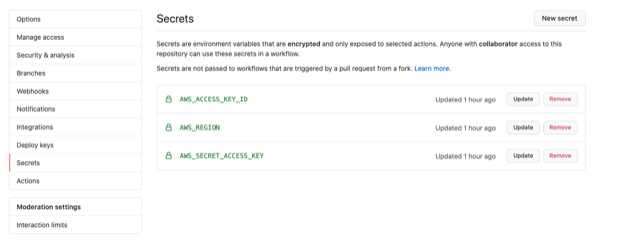
Specifically you need to set AWS_ACCESS_KEY_ID and AWS_SECRET_ACCESS_KEY and if you want to just copy and paste from my main.yaml file you should set AWS_REGION. This is exactly the stuff from configuring AWS CLI tools. That’s the action you will be taking: using AWS CLI to sync files to an S3 bucket.
Actions
In your repo, you need to make a folder that tells GitHub what to do.
mkdir -p .github/workflows
touch .github/workflows/main.yaml
In your favorite text editor, open .github/workflows/main.yaml and paste the following:
name: CopyToS3
on: [push]
jobs:
  build:
    runs-on: ubuntu-latest
    steps:
    - uses: actions/checkout@v1
    - name: Configure AWS Credentials
      uses: aws-actions/configure-aws-credentials@v1
      with:
        aws-access-key-id: ${{ secrets.AWS_ACCESS_KEY_ID }}
        aws-secret-access-key: ${{ secrets.AWS_SECRET_ACCESS_KEY }}
        aws-region: ${{ secrets.AWS_REGION }}
    - name: Copy Templates
      run: aws s3 sync . s3://<your-bucket-name> --delete
You can go peek at my working example for my bucket in S3.
Conclusion
This is so trivial and simple, but I had to go find a simple example because all the examples that are easily found are for much more complicated CI/CD behavior. I do owe a shout-out to a great example I found here for publishing a static web site.
Hope this helps someone!

