Most people think of a BrightSign player as a thing that plays - you load it with content, point it at a screen, and it pushes pixels. And yeah, if you’ve ever wired an RTSP camera feed into one, you know it’s a perfectly nice way to throw a live camera (or a few) on a wall. But that’s selling the box way short. There’s an NPU sitting in there, idle, and it can watch the room back.
That’s the whole point of argus-rtsp-watcher. It turns a single NPU-equipped BrightSign player into a multi-camera person-detection hub. Not just “display the feed.” Understand the feed - on-device, no cloud, telemetry out over MQTT. I’ve written before about Argus and the whole NPU repo family and about why edge AI has to run locally on signage. This is the same idea, aimed squarely at cameras.
Wait - it does person detection on the camera feed?
Yes. And this is the part I want to hammer on, because it’s easy to miss.
A BrightSign player with a Rockchip NPU can run a computer-vision pipeline - YOLOX for person detection, RetinaFace for face/gaze, ByteTrack to keep a stable ID on each person across frames - but point it at RTSP camera streams instead of a single webcam looking at your signage. The supervisor is a little Go process that spins up one independent C++ engine per camera, plus an MQTT broker, plus optional preview servers. Each engine runs its own pipeline on the shared NPU and lives in its own process group, so if one camera’s stream times out or the engine crashes, it restarts on its own and nobody else on the box even notices. That fault isolation is the kind of boring-but-critical detail that tells you someone built this to actually run, not to demo once and die.
How many cameras? Depends on the silicon:
- XT5 (RK3588): up to 8 streams at 5-10 fps (the primary target)
- XS6 / XD6 (RK3576): 4 streams at 5-10 fps
- LS5 / HS5 (RK3568): 1 stream
Here’s the trick that makes multi-stream basically free: a handful of cameras at 5-10 fps fit inside the inference budget of a single camera at 30 fps. You almost never need 30 fps to count people and watch where they go - so you spend that headroom on more cameras instead of more frames. Same chip, same ~3.5 watts, and on an XT5 that stretches all the way to eight feeds. (Configure more than a tier can handle and it’s a startup warning, not a crash - it tells you and runs what it can.)
No RTSP? Just plug in a webcam.
This is my favorite “lowers the bar to the floor” feature. You don’t need an RTSP camera at all. An engine’s source can be:
- an RTSP URL (your IP cameras, NVR feeds, whatever),
- a local video file (great for offline testing - the repo even ships looped-video harnesses so you can validate accuracy with no hardware), or
- a plain old USB webcam.
So the on-ramp is: grab a $20 webcam, plug it into the player, and you’ve got person detection. No camera infrastructure, no NVR, no RTSP server to stand up. Want to go bigger later? Point it at real RTSP streams and nothing else changes. And for the annoying real-world case - UniFi Protect and friends that only hand you secure rtsps/SRTP - the project can run MediaMTX as a proxy to convert that down to plain RTSP. The sharp edges are already sanded off.
Watch zones: trigger on the part of the frame you care about
Counting everyone in the whole frame is fine, but usually you care about a spot - the doorway, the queue, the area right in front of an endcap. argus-rtsp-watcher lets you draw a zone of interest right on each camera’s live view - normalized rectangles in 0..1 coordinates - and then pick how a person “counts” as being in it:
base- a person is in the zone only when their feet are in it.any- a person counts if any part of their bounding box overlaps the zone.
That distinction matters more than it looks. base is what you want for “is someone actually standing in the doorway,” because feet are where the person really is - not their head poking into the top of the zone from across the room. any is better for a tripwire-style “did anything cross into this area at all.” You get either one, per camera, per zone.
And crucially, it reports zone occupancy rather than suppressing everything outside the zone. You still get all the data; the zone is an annotation on top, so you can alert on “someone entered the front-porch zone” without throwing away the rest of the picture. You also set the outline color, line width, and alert-border width right there in the dashboard - that fat red border on the detection shot below is the zone alert firing.
Best part: you draw the zone, hit Save, and the change applies on the player within a few seconds - no reboot, and without disturbing the other cameras. Zones live alongside each stream’s source, target frame rate, and confidence thresholds in config.json, which hot-reloads. That’s a small thing until you’re tuning a live install and do not want to bounce five other cameras to nudge one threshold.
The data comes out over MQTT
No cloud round-trip. No video leaving the box unless you explicitly turn on an MJPEG preview. The inference happens on-device and the insights come out over MQTT - roughly one message per second per stream, on bs/argus/<stream-id>/analytics, in a versioned schema (analytics/v7.0) with a tracks array of every detected person and their attributes.
From any machine on the network:
mosquitto_sub -h xt5i -t 'bs/argus/#' -v
and you’ll watch JSON stream by, live:
{"schema":"analytics/v7.0","stream":"front-door","people":2,"tracks":[...]}
That’s the whole ballgame for integration. MQTT is dead simple, it’s the lingua franca of every home-automation and industrial-IoT stack on the planet, and it means wiring this into Node-RED, Home Assistant, a Prometheus exporter, or your own little Go service is an afternoon, not a project. There’s also a /healthz endpoint on :9200 that reports which SoC tier it detected and how much stream headroom you’ve got left - the kind of thing you’ll be glad exists the first time you deploy to a box and wonder why it’ll only take two cameras.
Seeing it work
When it catches people, the annotated preview draws the boxes right on the frame - this is the “oh, it’s actually working” moment you can put in front of a skeptic:
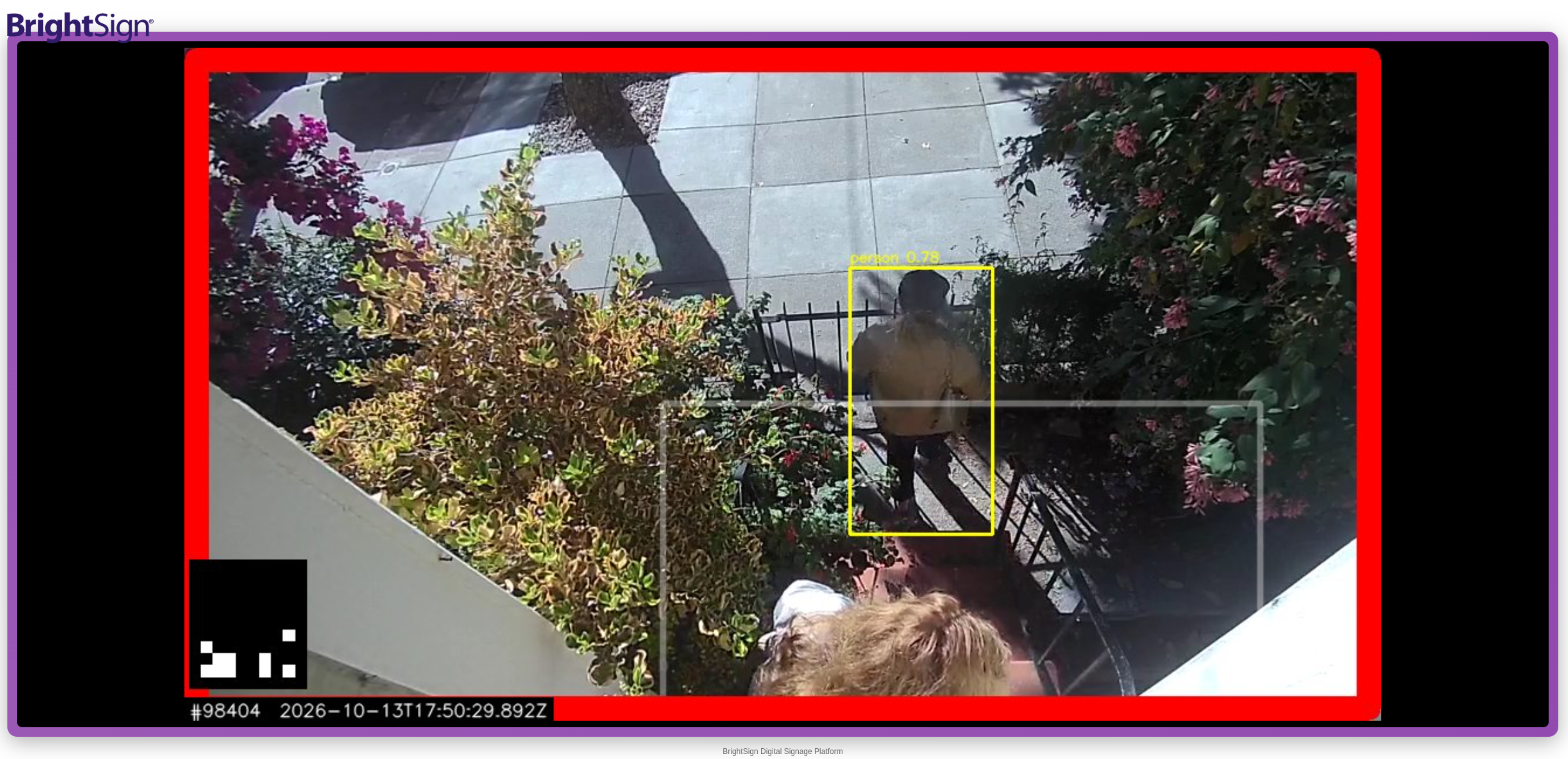
A person detected (person 0.78) with the box drawn live, and the red zone-alert border firing - all on the NPU, on-device, no cloud.
And there’s a Zone Dashboard served right off the player. Point a browser at port 20300 and every camera shows up as a live pane - draw your zone, pick any vs base, set the colors, Save, done:
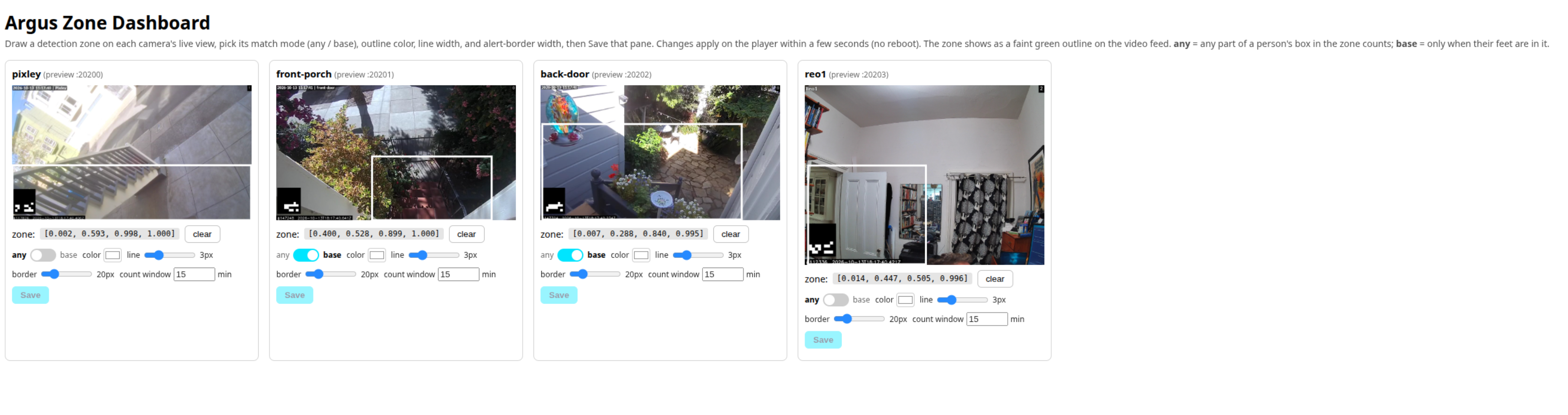
The Argus Zone Dashboard, live on an XT5 - four cameras, each with its own zone and match mode. (Screenshot: http://xt5i:20300/)
Raw MQTT is great for engineers and useless for convincing someone in a conference room. The dashboard and the annotated preview are the opposite. Point a camera at a doorway, walk through it, and watch the box light up in real time. Hard to argue with.
Why this matters
Think about what’s actually sitting out there. There are millions of BrightSign players already deployed, driving screens in retail, transit, QSR, corporate lobbies - and a large fraction of them have an idle NPU in them right now. The same box that’s playing your menu board or your wayfinding map can, with nothing but a software extension and a webcam, start telling you how many people walked past, how long they lingered at the display, whether they stepped into the zone you care about. No new hardware. No camera truck roll if a USB cam will do. No cloud bill and - this is the part your privacy-conscious customers will care about - no video leaving the box. It does person detection, not face recognition; nobody’s identity gets stored anywhere.
That’s a different product than “a nice way to watch your RTSP feeds.” It’s the same box doing a fundamentally bigger job.
Conclusion
argus-rtsp-watcher is a reference project, not a shrink-wrapped product - so treat it as a starting point, not a finished thing. But it’s a genuinely good one. Multi-camera person detection, on a player you may already own, fed by RTSP or a plain USB webcam, with watch zones you can tune live, exporting clean JSON over MQTT.
And you don’t even have to build it to try it. There’s a prebuilt extension (.bsfw) right on the releases page - drop it on the root of an SD card, drop a tiny config.json next to it pointing at your camera (or just set "usb": true), reboot the player, and browse to :20300. No toolchain, no cross-compile, no cache setup. If you do want to build from source, the repo walks you through all of it.
Go grab argus-rtsp-watcher, plug a webcam into a player, and watch the NPU earn its keep. And if you build something cool with it, drop me a note on LinkedIn - I genuinely want to see it.