Here’s a tiny, stupid problem that has stolen an embarrassing amount of my life: I plug a BrightSign player into my network, it grabs whatever dynamic IP the UniFi controller feels like handing out, and now I have to go find that IP before I can SSH in and do actual work. Claude skills and a new tool to the rescue!
It’s a thirty-second task. I’ve done it a thousand times. Log into the UniFi console, click into clients, squint at the list, find the thing that appeared in the last few minutes, copy the IP, paste it into a terminal. Thirty seconds. Maybe a minute if it grabbed a lease I didn’t expect and I have to hunt. That’s if the Unifi console updates - sometimes it does not seem up to date.
Thirty seconds, a thousand times, is not thirty seconds. It’s a slow leak. And every one of those little context-switches — leave the terminal, go to the browser, dig, come back — costs more than the clock says, because it yanks me out of whatever I was actually doing.
I finally fixed it. Not with a script I have to remember the syntax for. I fixed it by talking to Claude Code.
The New Workflow
These days the whole thing is a conversation:
Me: Is there a new device on my network?
Claude: Yes — a device from “BrightSign” just showed up at
192.168.1.147, MACxx:xx:xx:..., first seen two minutes ago.Me: Give it a fixed IP and call it
xt5-lab.Claude: Here’s the reservation I’ll add (shows me the host block and a dry-run). Apply it?
Me: Yes.
Done. That player now has a stable name and address forever. From that moment on I ssh xt5-lab and I’m in. No hunting. No console. No copy-paste. And the next time I re-flash it or move it, it comes back to the same address because the reservation is keyed to its MAC.
Think about what just happened there. I described what I wanted in plain English, and the machine did the network administration. That’s the whole thing.
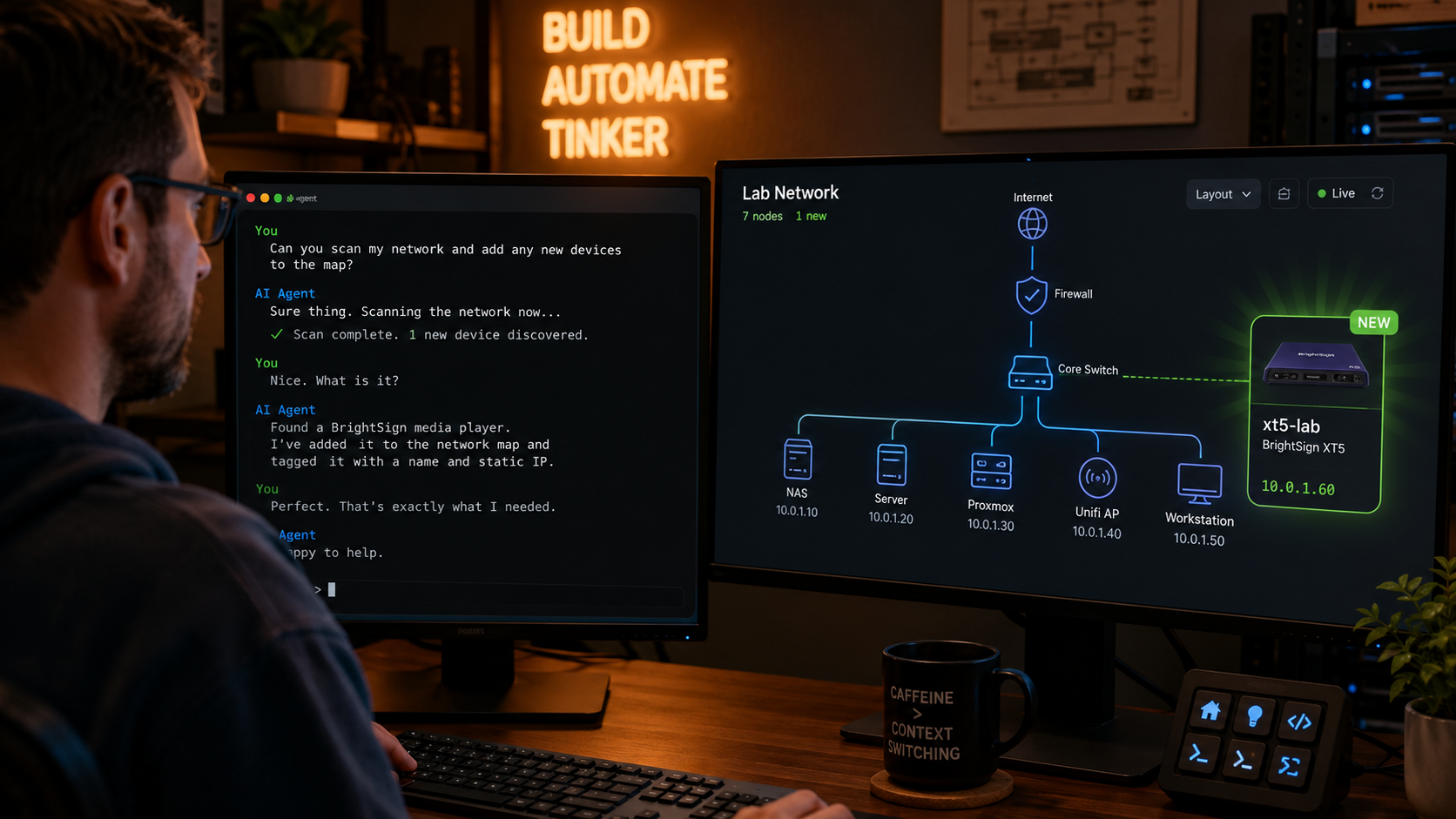
Describe what you want. The machine does the network admin.
Two Layers: The Tool and the Skill
This works because of two pieces I built that stack on top of each other.
The bottom layer is gofi — a Go module and CLI toolkit I wrote for driving a UniFi controller (a UDM Pro, in my case) from code instead of the web UI. It wraps the UniFi REST and WebSocket APIs behind a clean, type-safe Go interface, and it ships two small CLIs that do the actual work here:
gofimac— lists the clients on the network: MAC, IP, hostname, and manufacturer (it does an IEEE OUI lookup, which is how it knows a device is a “BrightSign” and not just some anonymous MAC). It can also show you devices seen in the last window, or ones that have gone away —--since 7d,--gone, that kind of thing. That’s the “is there a new device, and what is it?” half.gofips— reads and writes the fixed-IP reservations (DHCP reservations), using standard ISC DHCPhost {}blocks as its file format. That’s the “give it a fixed IP and a name” half.
It’s MIT-licensed and it’s out there. (You know how I feel about giving it back.)
The top layer is the unifi-fixed-hosts skill in my Claude Code plugin. This is the part that turns “I built a CLI tool” into “I just talk to my network.”
A skill is basically a little packet of knowledge that teaches Claude Code how to use a tool correctly — when to reach for it, which flags mean what, what the safe workflow is, and where the sharp edges are. Without the skill, I’d have to remember that gofimac -a means “all clients” but gofips -a means “add a host” (yes, the same short flag means different things across the two tools — I know, I know). With the skill, Claude already knows all of that. It knows to find the MAC with gofimac --json, snapshot the current reservations with gofips --get, edit the host file, and preview with --dry-run before touching anything.
Automation That Doesn’t Nuke Your Network
Here’s the part I’m actually proud of, and it’s not the flashy part.
The skill has a hard review gate baked into it. Changing DHCP reservations is mutating live network config — get it wrong and you can hand two devices the same address, or knock something important off the network. So the skill flat-out refuses to apply a change until it has shown me the full host file and the dry-run output, and I’ve explicitly said “yes.” Asking Claude to make the edit is not the same as approving the apply. That distinction is written right into the skill.
This is the thing people miss about agentic automation. The goal isn’t to remove the human — it’s to remove the toil and keep the human exactly where judgment matters. I don’t want to hand-edit ISC DHCP syntax. I do want to eyeball the diff before it hits my router. The skill draws that line for me, every single time, so I don’t have to remember to be careful. The carefulness is the automation.
Why This Adds Up
Let me connect this back to real work, because that’s where the payoff lives.
I’ve written before about developing BrightSign extensions — running your own native code on the player, which is really just an ARM64 Linux box with an NPU. That work is a tight loop: change code, push to the player, SSH in, run it, watch it fail, fix, repeat. Dozens of times a session. And every single one of those iterations starts with “get onto the player.”
If the player’s address moves around, every iteration pays the “find the IP” tax. Multiply that by a dozen loops an afternoon, times however many players I’m juggling, times however many afternoons. That’s not a slow leak anymore. That’s a bucket with a hole in it.
Pin the player to xt5-lab once, and the tax goes to zero. ssh xt5-lab. Forever. My muscle memory doesn’t even have to know what IP it is.
That’s the real story of these small automations: none of them is a big deal, and all of them together is an enormous deal. The thirty-second task you do a thousand times is exactly the thing worth automating, and it’s exactly the thing you never bother to automate because… it’s only thirty seconds. Agentic tooling flips that math. Building the automation used to cost more than the annoyance was worth. Now it doesn’t.
The Bigger Pattern
I keep coming back to this idea of building infrastructure for one — for exactly my homelab, my workflow, my weird pile of dev players.
gofi isn’t a product. Nobody asked me to build it. It scratches my specific itch of managing my specific UniFi setup from code. But because it’s a clean tool with a good interface, wrapping a skill around it was almost trivial — and now my whole network is something I can just talk to. Detect a device. Ask what it is. Name it. Pin it. All in the same terminal where I’m already working, in plain English, with a safety rail so I don’t do something dumb at 11pm.
The tool made the capability. The skill made it effortless. And the time it gives back, thirty seconds at a time, is real.
Both of those pieces are open source. If you run UniFi and you live in a terminal, go grab gofi and the plugin, and teach your own Claude Code to run your network.
If you build something with it — or if you’ve got your own “thirty seconds a thousand times” automation story — I’d love to hear it. Drop me a note on LinkedIn: linkedin.com/in/gherlein.